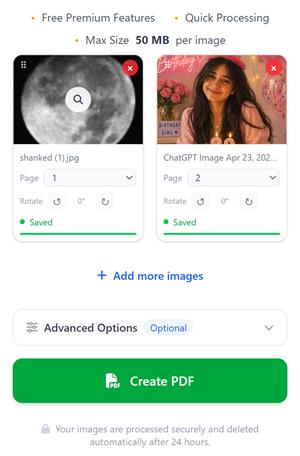
Todas las imágenes que hayas seleccionado aparecerán aquí durante 24 horas, a menos que las elimines. Esto significa simplemente que, si añades imágenes por la mañana y vuelves aquí por la tarde, verás las imágenes que habías seleccionado anteriormente.
¿Cómo es posible?
→Cuando seleccionas imágenes, las guardamos de forma segura en nuestro servidor para que no tengas que volver a subirlas.
→Cuando actualices la página o vuelvas a compressjpg.net más tarde, las imágenes que hayas seleccionado anteriormente seguirán estando aquí.
→Puedes seguir añadiendo imágenes en cualquier momento y generar el PDF con todas las imágenes seleccionadas cuando quieras.
Tus archivos se procesan de forma segura y se eliminan automáticamente al cabo de 24 horas.
Cómo convertir imágenes a PDF
Con esta herramienta podrás convertir fácilmente todos los formatos de imagen más habituales, como PNG, WebP, HEIC o JPG, a PDF. Conservamos la calidad original de la imagen en las páginas del PDF, lo que significa que la imagen que selecciones se insertará en la página del PDF sin pérdida de calidad.
Haz clic en el botón Seleccionar imágenes para subir imágenes desde tu dispositivo o arrastra y suelta las imágenes en la pantalla.
Reordena las imágenes arrastrándolas o ajustando el orden de las páginas antes de crear el PDF.
Personaliza tu PDF cambiando el nombre del archivo, añadiendo números de página, modificando la orientación, ajustando los márgenes o protegiendo el PDF con una contraseña desde la sección Opciones avanzadas.
Haz clic en el botón Crear PDF para generar y descargar tu PDF con el orden de imágenes seleccionado.
En cuestión de segundos, tu PDF estará listo y podrás descargarlo o compartirlo con quien quieras. Si tienes muchas imágenes, el proceso puede tardar un poco, dependiendo del tamaño de las imágenes y del número de páginas.
Pasos para convertir un archivo JPG a PDF
Convertir archivos JPG a PDF es muy fácil con nuestra herramienta. Sigue estos sencillos pasos:
Haz clic en el botón Seleccionar imágenes o simplemente arrastra y suelta tus archivos JPG.
Las imágenes JPG que hayas seleccionado aparecerán en el área de vista previa. Puedes añadir más imágenes JPG en cualquier momento.
Arrastra y suelta para reorganizar el orden de tus imágenes JPG según tus necesidades.
(Opcional) Haz clic en Opciones avanzadas para cambiar el nombre del PDF, añadir números de página, cambiar la orientación o establecer una contraseña.
Haz clic en el botón Crear PDF.
Tu PDF de alta calidad se generará al instante y estará listo para descargar.
Funciones que te permiten convertir imágenes a PDF
Captura o sube imágenes
Haz fotos directamente con tu cámara o selecciona imágenes de tu dispositivo.
Arrastra para cambiar el orden de las páginas
Organiza las páginas en el orden que desees arrastrando las fichas desde la esquina superior izquierda o utilizando el selector de números de página.
Girar páginas de PDF
Gira cualquier imagen en sentido horario o antihorario antes de convertirla a PDF.
Varios tamaños de página
Exportar en formato A4, Carta o A3, o ajustar cada página exactamente a las dimensiones de la imagen.
Proteger el PDF con contraseña
¿Tienes imágenes confidenciales? No te preocupes, configura una contraseña para el PDF privado en la pestaña «Opciones avanzadas».
Añadir imágenes desde una URL
Pega cualquier enlace de imagen de tus sitios web favoritos y nosotros la descargamos y la añadimos directamente, sin necesidad de descargarla.
Compartir al instante
Obtén un enlace para compartir y un código QR en cuanto tu PDF se haya puesto en cola. ¡Escanea el código QR desde otro dispositivo y descarga el PDF!
Memoria de sesión
¿Tienes muchas imágenes? Añade algunas. Puedes volver más tarde y tus imágenes seguirán ahí, exactamente donde las dejaste.
Se eliminará automáticamente en 24 horas
Todas las imágenes subidas y los archivos PDF generados se eliminan automáticamente al cabo de 24 horas. Asegúrate de crear el PDF en un plazo de 24 horas desde que añadas las imágenes.
Preguntas frecuentes
Todo lo que necesitas saber sobre cómo convertir imágenes a PDF en línea.
¿Cómo convertir un archivo JPG a PDF en línea y de forma gratuita?
+
Todo lo que necesitas saber sobre cómo convertir imágenes a PDF en línea.
¿Puedo combinar varias imágenes en un solo PDF?
+
Sí. Puedes subir varios archivos de imagen en formato JPG, PNG, WebP, HEIC u otros, y fusionarlos en un único documento PDF.
¿Cómo puedo añadir imágenes a un PDF?
+
Puedes seleccionar imágenes de tu dispositivo, hacer una foto con la cámara o pegar la URL de una imagen para añadirlas aquí y generar el PDF.
¿Se reducirá la calidad de la imagen tras la conversión?
+
No. Las imágenes se incrustan sin comprimir, por lo que obtienes un PDF original de alta calidad que se corresponde con la imagen real.
¿Puedo cambiar el orden de las imágenes antes de crear el PDF?
+
Sí. Puedes arrastrar y soltar imágenes para cambiar el orden de las páginas antes de generar el PDF o seleccionar su orden.
¿Qué formatos de imagen son compatibles?
+
Admitimos los formatos de imagen JPG, JPEG, PNG, WebP, HEIC, HEIF, BMP, TIFF y GIF.
¿Es gratuito este conversor de JPG a PDF?
+
Sí. Puedes convertir tantas imágenes como quieras a PDF en línea y de forma gratuita sin necesidad de crear una cuenta. Sin embargo, crear una cuenta te ofrece muchas ventajas, como la posibilidad de ver tus archivos en cualquier dispositivo una vez que hayas iniciado sesión.
¿Puedo proteger con contraseña el PDF generado?
+
Sí. Puedes establecer la contraseña para abrir el PDF desde la pestaña de configuración avanzada antes de crear el archivo. De esta forma, podrás crear fácilmente archivos PDF cifrados a partir de tus imágenes.
¿Están seguras las imágenes que he subido?
+
Sí. Todos los archivos se procesan de forma segura y se eliminan automáticamente de nuestros servidores tras un periodo de tiempo limitado. También puedes eliminarlos manualmente pulsando el botón «Eliminar» o accediendo a «Mis archivos» desde el menú de navegación para ver tus archivos y eliminarlos.
¿Puedo crear un PDF a partir de más de 100 imágenes?
+
No importa si tienes cientos o miles de imágenes: creamos un PDF con todas ellas.