온라인에서 무료로 이미지를 PDF로 변환하기
이미지를 선택하거나 캡처하고, 이미지 URL을 붙여넣은 다음, 이를 PDF 페이지로 배열하여 하나의 PDF 문서로 변환합니다.
-
•
무료 프리미엄 기능
-
•
신속한 처리
-
•
이미지당 최대 크기 50 MB
이미지 선택
이미지를 추가할 방법을 선택하세요
아직 이미지가 추가되지 않았습니다.
선택한 모든 이미지는 삭제하지 않는 한 24시간 동안 이곳에 표시됩니다. 즉, 아침에 이미지를 추가했다가 저녁에 다시 이곳을 방문하면 이전에 선택했던 이미지들을 볼 수 있다는 뜻입니다.
어떻게 이런 일이 가능할까요?
-
→
이미지를 선택하시면, 당사의 서버에 안전하게 저장되므로 다시 업로드하실 필요가 없습니다.
-
→
페이지를 새로 고치거나 나중에 compressjpg.net으로 다시 방문하더라도, 이전에 선택했던 이미지들은 그대로 남아 있을 것입니다.
-
→
언제든지 이미지를 더 추가할 수 있으며, 원할 때 언제든지 선택한 모든 이미지를 바탕으로 PDF를 생성할 수 있습니다.
사용자의 파일은 안전하게 처리되며, 24시간 후 자동으로 삭제됩니다.
이미지를 PDF로 변환하는 방법
이 도구를 사용하면 PNG, WebP, HEIC, JPG 등 모든 주요 이미지 형식을 PDF로 쉽게 변환할 수 있습니다. PDF 페이지에서도 원본 이미지 품질을 그대로 유지하므로, 선택한 이미지는 화질 저하 없이 PDF 페이지로 삽입됩니다.
-
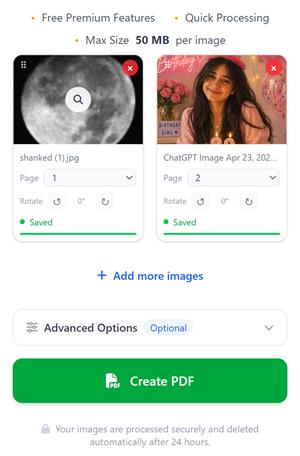
이미지 선택 버튼을 클릭하여 기기에서 이미지를 업로드하거나, 이미지를 화면으로 드래그 앤 드롭하세요.
-
PDF를 생성하기 전에 이미지를 드래그하거나 페이지 순서를 조정하여 이미지 순서를 재정렬하십시오.
-
고급 옵션 섹션에서 파일 이름 변경, 페이지 번호 추가, 방향 변경, 여백 조정 또는 비밀번호로 PDF를 보호하는 등의 방법으로 PDF를 사용자 지정할 수 있습니다.
-
PDF 생성 버튼을 클릭하면 선택한 이미지 순서대로 PDF 파일이 생성되어 다운로드됩니다.
몇 초 안에 PDF 파일이 생성되며, 다운로드하거나 원하는 사람과 공유할 수 있습니다. 이미지가 많을 경우, 이미지 크기와 페이지 수에 따라 시간이 다소 걸릴 수 있습니다.
JPG를 PDF로 변환하는 단계
저희 도구를 사용하면 JPG를 PDF로 변환하는 것이 매우 쉽습니다. 다음의 간단한 단계를 따르세요:
-
이미지 선택 버튼을 클릭하거나, JPG 파일을 드래그 앤 드롭하세요.
-
선택하신 JPG 이미지가 미리보기 영역에 표시됩니다. 언제든지 JPG 이미지를 더 추가할 수 있습니다.
-
드래그 앤 드롭을 통해 필요에 따라 JPG 이미지의 순서를 재정렬하세요.
-
(선택 사항) 고급 옵션을 클릭하여 PDF 파일 이름을 변경하거나, 페이지 번호를 추가하거나, 방향 설정을 변경하거나, 비밀번호를 설정할 수 있습니다.
-
PDF 생성 버튼을 클릭하세요.
-
고화질 PDF 파일이 즉시 생성되어 다운로드할 수 있게 됩니다.
이미지를 PDF로 변환할 수 있게 해주는 기능들
-
이미지 촬영 또는 업로드
카메라로 직접 사진을 찍거나 기기에서 이미지를 선택하세요.
-
드래그하여 페이지 순서 변경
카드를 왼쪽 상단 모서리에서 드래그하거나 페이지 번호 선택기를 사용하여 페이지를 원하는 순서대로 정렬할 수 있습니다.
-
PDF 페이지 회전하기
PDF로 변환하기 전에 이미지를 시계 방향 또는 반시계 방향으로 회전할 수 있습니다.
-
다양한 페이지 크기
A4, Letter, A3 크기로 내보내거나, 각 페이지를 이미지 크기에 정확히 맞추세요.
-
PDF에 비밀번호 설정하기
비밀 이미지가 있으신가요? 걱정 마세요. ‘고급 옵션’ 탭에서 비공개 PDF에 비밀번호를 설정하세요.
-
URL에서 이미지 추가하기
좋아하는 웹사이트의 이미지 링크를 붙여넣기만 하면, 저희가 해당 이미지를 직접 불러와 추가해 드립니다. 별도로 다운로드할 필요가 없습니다.
-
바로 공유하기
PDF가 처리 대기열에 등록되는 즉시 공유 가능한 링크와 QR 코드를 받아보세요. 다른 기기에서 QR 코드를 스캔하여 PDF를 다운로드하세요!
-
세션 메모리
사진이 많으신가요? 사진을 몇 장 추가해 보세요. 나중에 다시 방문해도 사진들은 그대로 남아 있을 거예요 — 중단했던 바로 그 위치에 말이죠.
-
24시간 후 자동 삭제됨
업로드된 모든 이미지와 생성된 PDF 파일은 24시간 후에 자동으로 삭제됩니다. 이미지를 추가한 후 24시간 이내에 PDF 파일을 생성하시기 바랍니다.
자주 묻는 질문
온라인에서 이미지를 PDF로 변환하는 데 필요한 모든 정보.
JPG 파일을 온라인에서 무료로 PDF로 변환하는 방법은 무엇인가요?
+
'이미지 선택'을 클릭하고, JPG 또는 PNG 파일을 업로드한 다음, 원하는 순서대로 배열한 후 'PDF 만들기'를 누르세요.
여러 장의 이미지를 하나의 PDF 파일로 합칠 수 있나요?
+
네. JPG, PNG, WebP, HEIC 또는 기타 이미지 파일을 여러 개 업로드하여 하나의 PDF 문서로 병합할 수 있습니다.
PDF에 이미지를 어떻게 추가할 수 있나요?
+
PDF 생성을 위해 기기에서 이미지를 선택하거나, 카메라로 촬영하거나, 이미지 URL을 붙여넣어 여기에 추가할 수 있습니다.
변환 후 화질이 저하되나요?
+
아니요. 이미지는 압축 없이 삽입되므로, 실제 이미지와 동일한 고화질의 원본 PDF 파일을 받으실 수 있습니다.
PDF를 생성하기 전에 이미지 순서를 변경할 수 있나요?
+
네. PDF를 생성하기 전에 이미지를 드래그 앤 드롭하여 페이지 순서를 변경하거나 순서를 직접 지정할 수 있습니다.
어떤 이미지 형식을 지원하나요?
+
JPG, JPEG, PNG, WebP, HEIC, HEIF, BMP, TIFF 및 GIF 이미지 형식을 지원합니다.
이 JPG-PDF 변환기는 무료로 사용할 수 있나요?
+
네. 계정을 만들지 않아도 온라인에서 무료로 원하는 만큼 이미지를 PDF로 변환할 수 있습니다. 하지만 계정을 만들면 로그인 후 어떤 기기에서든 파일을 확인할 수 있는 등 여러모로 유용합니다.
생성된 PDF 파일에 비밀번호를 설정할 수 있나요?
+
네. PDF를 생성하기 전에 ‘고급 설정’ 탭에서 PDF를 열 때 필요한 비밀번호를 설정할 수 있습니다. 이렇게 하면 이미지를 사용하여 암호화된 PDF를 쉽게 만들 수 있습니다.
제가 업로드한 이미지는 안전하게 보호되고 있나요?
+
네. 모든 파일은 안전하게 처리되며, 일정 기간이 지나면 당사 서버에서 자동으로 삭제됩니다. 또한 삭제 버튼을 눌러 수동으로 파일을 삭제하거나, 탐색 메뉴에서 ‘내 파일’로 이동하여 파일을 확인한 뒤 삭제할 수도 있습니다.
100장 이상의 이미지로 PDF를 만들 수 있나요?
+
이미지가 수백 개든 수천 개든 상관없이, 당사는 그 모든 이미지를 PDF 파일로 변환해 드립니다.