Pilih cara yang Anda inginkan untuk menambahkan gambar
Masukkan URL gambar apa pun
Belum ada gambar yang ditambahkan.
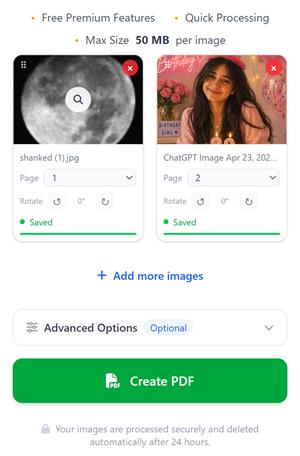
Semua gambar yang Anda pilih akan ditampilkan di sini selama 24 jam, kecuali jika Anda menghapusnya. Artinya, jika Anda menambahkan gambar pada pagi hari dan kembali ke sini pada malam hari, Anda akan melihat gambar-gambar yang sebelumnya telah Anda pilih.
Bagaimana hal ini bisa terjadi?
→Saat Anda memilih gambar, kami menyimpannya dengan aman di server kami sehingga Anda tidak perlu mengunggahnya lagi.
→Saat Anda menyegarkan halaman atau kembali ke compressjpg.net nanti, gambar-gambar yang sebelumnya Anda pilih akan tetap ada di sini.
→Anda dapat terus menambahkan gambar kapan saja dan membuat file PDF dari semua gambar yang dipilih kapan pun Anda mau.
File Anda diproses dengan aman dan dihapus secara otomatis setelah 24 jam.
Cara Mengonversi Gambar ke PDF
Dengan alat ini, Anda dapat dengan mudah mengonversi semua format gambar utama, termasuk PNG, WebP, HEIC, atau JPG, ke PDF. Kami mempertahankan kualitas gambar asli pada halaman PDF, artinya gambar yang Anda pilih akan ditampilkan sebagai halaman PDF tanpa kehilangan kualitas.
Klik tombol Pilih Gambar untuk mengunggah gambar dari perangkat Anda atau seret dan lepas gambar ke layar.
Atur ulang urutan gambar dengan menyeret gambar atau menyesuaikan urutan halaman sebelum membuat file PDF.
Sesuaikan PDF Anda dengan mengganti nama file, menambahkan nomor halaman, mengubah orientasi, menyesuaikan margin, atau melindungi PDF dengan kata sandi dari bagian Opsi lanjutan.
Klik tombol Buat PDF untuk membuat dan mengunduh file PDF Anda sesuai urutan gambar yang dipilih.
Dalam hitungan detik, file PDF Anda akan selesai dibuat dan siap diunduh atau dibagikan kepada siapa pun yang Anda inginkan. Jika Anda memiliki banyak gambar, prosesnya mungkin memerlukan waktu tergantung pada ukuran gambar dan jumlah halaman.
Langkah-langkah untuk Mengonversi JPG ke PDF
Mengonversi JPG ke PDF sangat mudah dengan alat kami. Ikuti langkah-langkah sederhana berikut ini:
Klik tombol Pilih Gambar atau cukup seret dan lepaskan file JPG Anda.
Gambar JPG yang Anda pilih akan muncul di area pratinjau. Anda dapat menambahkan gambar JPG lainnya kapan saja.
Seret dan lepas untuk mengatur ulang urutan gambar JPG Anda sesuai kebutuhan.
(Opsional) Klik Opsi lanjutan untuk mengganti nama file PDF Anda, menambahkan nomor halaman, mengubah orientasi, atau mengatur kata sandi.
Klik tombol Buat PDF.
PDF berkualitas tinggi Anda akan langsung dibuat dan siap diunduh.
Fitur yang memudahkan Anda mengonversi gambar ke PDF
Ambil atau unggah gambar
Ambil foto langsung menggunakan kamera Anda atau pilih gambar dari perangkat Anda.
Seret untuk mengatur ulang urutan halaman
Atur halaman sesuai urutan yang diinginkan dengan menyeret kartu dari sudut kiri atas atau menggunakan pemilih nomor halaman.
Memutar halaman PDF
Putar gambar apa pun searah jarum jam atau berlawanan arah jarum jam sebelum mengonversinya ke PDF.
Berbagai ukuran halaman
Ekspor sebagai A4, Letter, A3, atau sesuaikan setiap halaman agar pas dengan ukuran gambar.
Lindungi PDF dengan kata sandi
Punya gambar rahasia? Jangan khawatir, atur kata sandi untuk PDF pribadi di tab Opsi Lanjutan
Tambahkan Gambar dari URL
Tempelkan tautan gambar apa pun dari situs web favorit Anda, dan kami akan mengambil serta menambahkannya secara langsung — tidak perlu mengunduh.
Bagikan sekarang juga
Dapatkan tautan yang dapat dibagikan dan kode QR begitu PDF Anda masuk ke antrean. Pindai kode QR tersebut dari perangkat lain dan unduh PDF-nya!
Memori sesi
Punya banyak gambar? Tambahkan beberapa gambar. Anda bisa kembali nanti dan gambar-gambar Anda akan tetap ada di sana — persis di tempat Anda meninggalkannya.
Dihapus otomatis dalam 24 jam
Semua gambar yang diunggah dan berkas PDF yang dihasilkan akan dihapus secara otomatis setelah 24 jam. Pastikan Anda membuat berkas PDF tersebut dalam waktu 24 jam setelah mengunggah gambar.
Pertanyaan yang Sering Diajukan
Semua yang perlu Anda ketahui tentang mengonversi gambar ke PDF secara online.
Bagaimana cara mengonversi JPG ke PDF secara online dan gratis?
+
Klik ‘Pilih Gambar’, unggah berkas JPG atau PNG Anda, atur urutannya sesuai keinginan, lalu tekan ‘Buat PDF’.
Bisakah saya menggabungkan beberapa gambar menjadi satu file PDF?
+
Ya. Anda dapat mengunggah beberapa berkas gambar berformat JPG, PNG, WebP, HEIC, atau format lainnya, lalu menggabungkannya menjadi satu dokumen PDF.
Bagaimana cara menambahkan gambar ke PDF?
+
Anda dapat memilih gambar dari perangkat Anda, mengambil foto langsung dari kamera, atau menempelkan tautan gambar untuk ditambahkan di sini guna membuat file PDF.
Apakah kualitas gambar akan menurun setelah dikonversi?
+
Tidak. Gambar disematkan tanpa kompresi, sehingga Anda akan mendapatkan file PDF berkualitas tinggi yang sesuai dengan gambar aslinya.
Bisakah saya mengubah urutan gambar sebelum membuat PDF?
+
Ya. Anda dapat menyeret dan melepas gambar untuk mengatur ulang urutan halaman sebelum membuat file PDF atau memilih urutannya.
Format gambar apa saja yang didukung?
+
Kami mendukung format gambar JPG, JPEG, PNG, WebP, HEIC, HEIF, BMP, TIFF, dan GIF.
Apakah konverter JPG ke PDF ini gratis?
+
Ya. Anda dapat mengonversi gambar sebanyak apa pun ke format PDF secara online dan gratis tanpa perlu membuat akun. Namun, membuat akun akan memberikan banyak keuntungan, misalnya Anda dapat mengakses file-file Anda dari perangkat apa pun setelah masuk ke akun Anda.
Bisakah saya melindungi PDF yang dihasilkan dengan kata sandi?
+
Ya. Anda dapat mengatur kata sandi untuk membuka berkas PDF melalui tab pengaturan lanjutan sebelum membuat berkas PDF Anda. Dengan cara ini, Anda dapat dengan mudah membuat berkas PDF terenkripsi dari gambar-gambar Anda.
Apakah gambar yang saya unggah aman?
+
Ya. Semua berkas diproses dengan aman dan secara otomatis dihapus dari server kami setelah jangka waktu tertentu. Anda juga dapat menghapusnya secara manual dengan menekan tombol hapus atau membuka menu “Berkas Saya” dari menu navigasi untuk melihat berkas-berkas Anda dan menghapusnya.
Bisakah saya membuat file PDF dari lebih dari 100 gambar?
+
Tidak masalah apakah Anda memiliki ratusan atau ribuan gambar, kami akan membuat file PDF dari semua gambar tersebut.