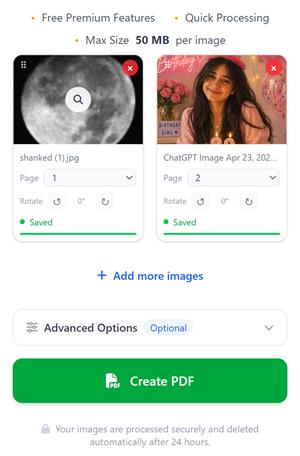
Alle bildene du har valgt, vil vises her i 24 timer, med mindre du sletter dem. Dette betyr ganske enkelt at hvis du legger til bilder om morgenen, vil du se de bildene du valgte tidligere når du kommer tilbake hit om kvelden.
Hvordan er dette mulig?
→Når du velger bilder, lagrer vi dem sikkert på serveren vår, slik at du ikke trenger å laste dem opp på nytt.
→Når du oppdaterer siden eller kommer tilbake til compressjpg.net senere, vil bildene du tidligere har valgt fortsatt være her.
→Du kan når som helst legge til flere bilder og lage en PDF-fil av alle de valgte bildene når du ønsker det.
Filene dine behandles på en sikker måte og slettes automatisk etter 24 timer.
Slik konverterer du bilder til PDF
Med dette verktøyet kan du enkelt konvertere alle de vanligste bildeformatene, inkludert PNG, WebP, HEIC og JPG, til PDF. Vi bevarer den opprinnelige bildekvaliteten i PDF-sidene, noe som betyr at bildet du velger, blir lagt inn som en PDF-side uten tap av kvalitet.
Klikk på knappen Velg bilder for å laste opp bilder fra enheten din, eller dra og slipp bilder på skjermen.
Endre rekkefølgen på bildene ved å dra dem eller justere siderekkefølgen før du oppretter PDF-filen.
Du kan tilpasse PDF-filen ved å gi den et nytt navn, legge til sidetall, endre retningen, justere margene eller beskytte PDF-filen med et passord fra seksjonen Avanserte innstillinger.
Klikk på knappen Lag PDF for å generere og laste ned PDF-filen i den valgte bilderekkefølgen.
I løpet av få sekunder vil PDF-filen din være klar, og du kan laste den ned eller dele den med hvem du vil. Hvis du har mange bilder, kan det ta litt tid, avhengig av bildestørrelsen og antall sider.
Fremgangsmåte for å konvertere JPG til PDF
Det er veldig enkelt å konvertere JPG til PDF med verktøyet vårt. Følg disse enkle trinnene:
Klikk på knappen Velg bilder, eller dra og slipp JPG-filene dine.
De valgte JPG-bildene dine vises i forhåndsvisningsområdet. Du kan når som helst legge til flere JPG-bilder.
Dra og slipp for å endre rekkefølgen på JPG-bildene dine etter behov.
(Valgfritt) Klikk på Avanserte innstillinger for å gi PDF-filen et nytt navn, legge til sidetall, endre retning eller angi passord.
Klikk på knappen Lag PDF.
Din PDF-fil i høy kvalitet blir generert umiddelbart og er klar til nedlasting.
Funksjoner som gjør det enkelt å konvertere bilder til PDF
Ta bilder eller last opp bilder
Ta bilder direkte med kameraet ditt, eller velg bilder fra enheten din.
Dra for å endre rekkefølgen på sidene
Du kan ordne sidene i hvilken som helst rekkefølge ved å dra kortene fra øverste venstre hjørne eller ved å bruke sidenummervelgeren.
Roter PDF-sider
Du kan rotere et hvilket som helst bilde med eller mot klokken før du konverterer det til PDF.
Flere sidestørrelser
Eksporter som A4, Letter, A3, eller tilpass hver side nøyaktig til bildets dimensjoner.
Passordbeskytt PDF-fil
Har du hemmelige bilder? Ikke bekymre deg – du kan angi et passord for private PDF-filer under fanen «Avanserte innstillinger»
Legg til bilder fra en nettadresse
Lim inn en hvilken som helst bildelink fra favorittnettstedene dine, så henter vi den og legger den til direkte – uten at du trenger å laste den ned.
Del umiddelbart
Få en delbar lenke og en QR-kode så snart PDF-filen din er lagt til i køen. Skann QR-koden fra en annen enhet og last ned PDF-filen!
Sesjonsminne
Har du mange bilder? Legg til noen bilder. Du kan komme tilbake senere, og bildene dine vil fortsatt være der – akkurat der du sluttet.
Slettes automatisk etter 24 timer
Alle opplastede bilder og genererte PDF-filer slettes automatisk etter 24 timer. Sørg for å opprette PDF-filen innen 24 timer etter at du har lagt til bildene.
Ofte stilte spørsmål
Alt du trenger å vite om å konvertere bilder til PDF på nettet.
Hvordan konverterer man JPG til PDF gratis på nettet?
+
Klikk på «Velg bilder», last opp JPG- eller PNG-filene dine, ordne dem i ønsket rekkefølge og trykk på «Lag PDF».
Kan jeg slå sammen flere bilder til én PDF-fil?
+
Ja. Du kan laste opp flere JPG-, PNG-, WebP-, HEIC- eller andre bildefiler og slå dem sammen til ett enkelt PDF-dokument.
Hvordan kan jeg legge til bilder i en PDF-fil?
+
Du kan enten velge bilder fra enheten din, ta et bilde med kameraet eller lime inn en bilde-URL for å legge dem til her, slik at PDF-filen kan genereres.
Vil bildekvaliteten bli dårligere etter konverteringen?
+
Nei. Bildene er innebygd uten komprimering, slik at du får en PDF-fil i original høy kvalitet som samsvarer med det faktiske bildet.
Kan jeg endre rekkefølgen på bildene før jeg lager PDF-filen?
+
Ja. Du kan dra og slippe bilder for å endre rekkefølgen på sidene før du genererer PDF-filen, eller velge rekkefølgen selv.
Hvilke bildeformater støttes?
+
Vi støtter bildeformatene JPG, JPEG, PNG, WebP, HEIC, HEIF, BMP, TIFF og GIF.
Er denne JPG-til-PDF-konverteren gratis å bruke?
+
Ja. Du kan konvertere et ubegrenset antall bilder til PDF på nettet helt gratis uten å opprette en konto. Det er imidlertid mange fordeler ved å opprette en konto – for eksempel kan du se filene dine på alle enheter når du har logget inn på kontoen din.
Kan jeg passordbeskytte den genererte PDF-filen?
+
Ja. Du kan angi passordet for å åpne PDF-filen under fanen «Avanserte innstillinger» før du oppretter PDF-filen. På denne måten kan du enkelt opprette krypterte PDF-filer fra bildene dine.
Er bildene jeg har lastet opp sikre?
+
Ja. Alle filer behandles på en sikker måte og slettes automatisk fra serverne våre etter en begrenset periode. Du kan også slette dem manuelt ved å trykke på sletteknappen, eller gå til «Mine filer» i navigasjonsmenyen for å se filene dine og slette dem.
Kan jeg lage en PDF-fil av mer enn 100 bilder?
+
Det spiller ingen rolle om du har hundrevis eller tusenvis av bilder – vi lager en PDF-fil av alle bildene.