Convert Images to PDF Online for Free

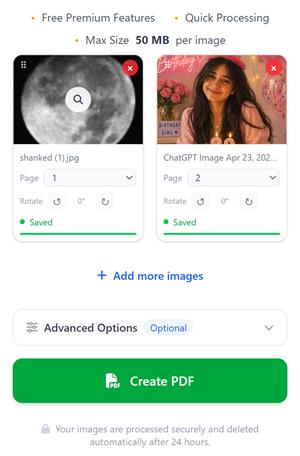
Select or capture images, paste image URLs, arrange them as PDF pages and convert those images into a single PDF document.

  • Free Premium Features
  • Quick Processing
  • Max Size 50 MB per image

No images added yet.

Your all selected images will appear here for 24 hours unless you delete them. This simply means that if you add images in the morning and when you come back here in the evening you will see your previously selected images.

How is this possible?

  • When you select images, we securely save them on our server so you don’t have to upload them again.
  • When you refresh the page or return to compressjpg.net later, your previously selected images will still be here.
  • You can continue adding more images anytime and create the PDF from all selected images whenever you want.

Your files are processed securely and deleted automatically after 24 hours.

How to Convert images to PDF

Using this tool you can easily convert all major image formats including PNG, WebP, HEIC or JPG to PDF. We keep original image quality in PDF pages, means the image you select will get pasted as pdf page without quality loss.

Step by step process to convert JPG images into PDF
  1. Click on Select Images button to upload images from your device or drag and drop images onto the screen.
  2. Rearrange image order by dragging images or adjusting the page sequence before creating the PDF.
  3. Customize your PDF by renaming the file, adding page numbers, changing orientation, adjusting margins, or protecting the PDF with a password from the Advance options section.
  4. Click the Create PDF button to generate and download your PDF in the selected image order.

Within seconds your pdf will be created and available to download or share the PDF with anyone you want. If you have large number of images, it may take some time according to the image size and number of pages.

Steps to Convert JPG to PDF

Converting JPG to PDF is very easy with our tool. Follow these simple steps:

  1. Click on the Select Images button or simply drag and drop your JPG files.
  2. Your selected JPG images will appear in the preview area. You can add more JPG images anytime.
  3. Drag and drop to rearrange the order of your JPG images as per your requirement.
  4. (Optional) Click on Advance options to rename your PDF, add page numbers, change orientation, or set password.
  5. Click on the Create PDF button.
  6. Your high-quality PDF will be generated instantly and ready to download.

Features that fulfills you to convert images to PDF

Často kladené otázky

Everything you need to know about converting images to PDF online.

How to convert JPG to PDF online for free? +

Click on 'Select Images', upload your JPG or PNG files, arrange them in the desired order, and press 'Create PDF'.

Can I combine multiple images into one PDF? +

Yes. You can upload multiple JPG, PNG, WebP, HEIC, or other image files and merge them into a single PDF document.

How can i add images for PDF? +

You can either select images from your device,capture from the camera or paste image url to add here for pdf generation.

Will image quality be reduced after conversion? +

No. Images are embedded without compression, so you get original high quality pdf that matches with the actual image.

Can I rearrange image order before creating the PDF? +

Yes. You can drag and drop images to reorder pages before generating the PDF or select their order.

Jaké formáty obrázků jsou podporovány? +

We support JPG, JPEG, PNG, WebP, HEIC, HEIF, BMP, TIFF, and GIF image formats.

Is this JPG to PDF converter free to use? +

Yes. You can convert unlimited images to PDF online for free without creating any account. However creating account benefits you in many cases like you can see your files in any device after you login to your account.

Can I password protect the generated PDF? +

Yes. You can set the password to open PDF from the advanced settings tab before creating your PDF. In this way you can easily create encrypted PDF from your images.

Are my uploaded images secure? +

Yes. All Files are processed securely and automatically removed from our servers after a limited time. You can also manually delete them by pressing delete button or go to my files from the navigation menu to see your files and delete them.

Can I create PDF from more than 100 images? +

Doesn't matter if you have hundereds of images or thousand, we create PDF from all those images.

Naše nástroje

Prozkoumejte různé nástroje, které podporují vaše každodenní operace s obrázky a PDF.

Komprimovat obrázek

Zmenšete velikost obrázku bez ztráty kvality.

Komprimovat PDF

Zmenšete velikost souborů PDF online bez ztráty kvality stránek PDF.

Image to PDF Maker

Scan Images, make PDF documents from multiple images, Lock PDF and share

JPG to PDF

Převeďte jeden obrázek nebo více obrázků do PDF.

PDF do obrázku

Extrahujte stránky PDF jako obrázky.

Kombinujte PDF online

Zkombinujte zdarma více souborů PDF a obrázků do jednoho souboru PDF.

Rozdělit stránky PDF

Rozdělte nebo extrahujte stránky PDF do samostatných stránek PDF snadno zdarma.

Odstraňte stránky z PDF

Odstraňte nežádoucí stránky ze souboru PDF online.

Obrázek do ZIP

Vložte více obrázků do jednoho souboru ZIP online.

Upravit obrázek

Oříznutí, změna velikosti, otočení a přidání textu do obrázků.

Změnit velikost obrázku

Změna velikosti obrázku online – Změňte rozměry obrázku nebo zmenšete či zvětšete velikost obrázku v kB

Zamknout PDF

Zamkněte PDF heslem, abyste zabránili nechtěnému přístupu.

Odemknout PDF

Odstraňte heslo ze souborů PDF.

Komprimujte JPEG na 100 kB

Komprimujte obrázky JPEG na 100 kB nebo méně online.

Komprimujte JPEG na 50 kB

Komprimujte obrázky JPEG na 50 kB nebo méně online.

Komprimujte JPEG na 20 kB

Komprimujte obrázky JPEG na 20 kB nebo méně online.

Komprimujte JPEG na 200 kB

Komprimujte obrázky JPEG na 200 kB nebo méně online.

Image to Caption

Generate engaging AI-powered captions and hashtags for your images instantly